1. The Offline-to-Online (O2O) Friction Gap in Modern Marketing
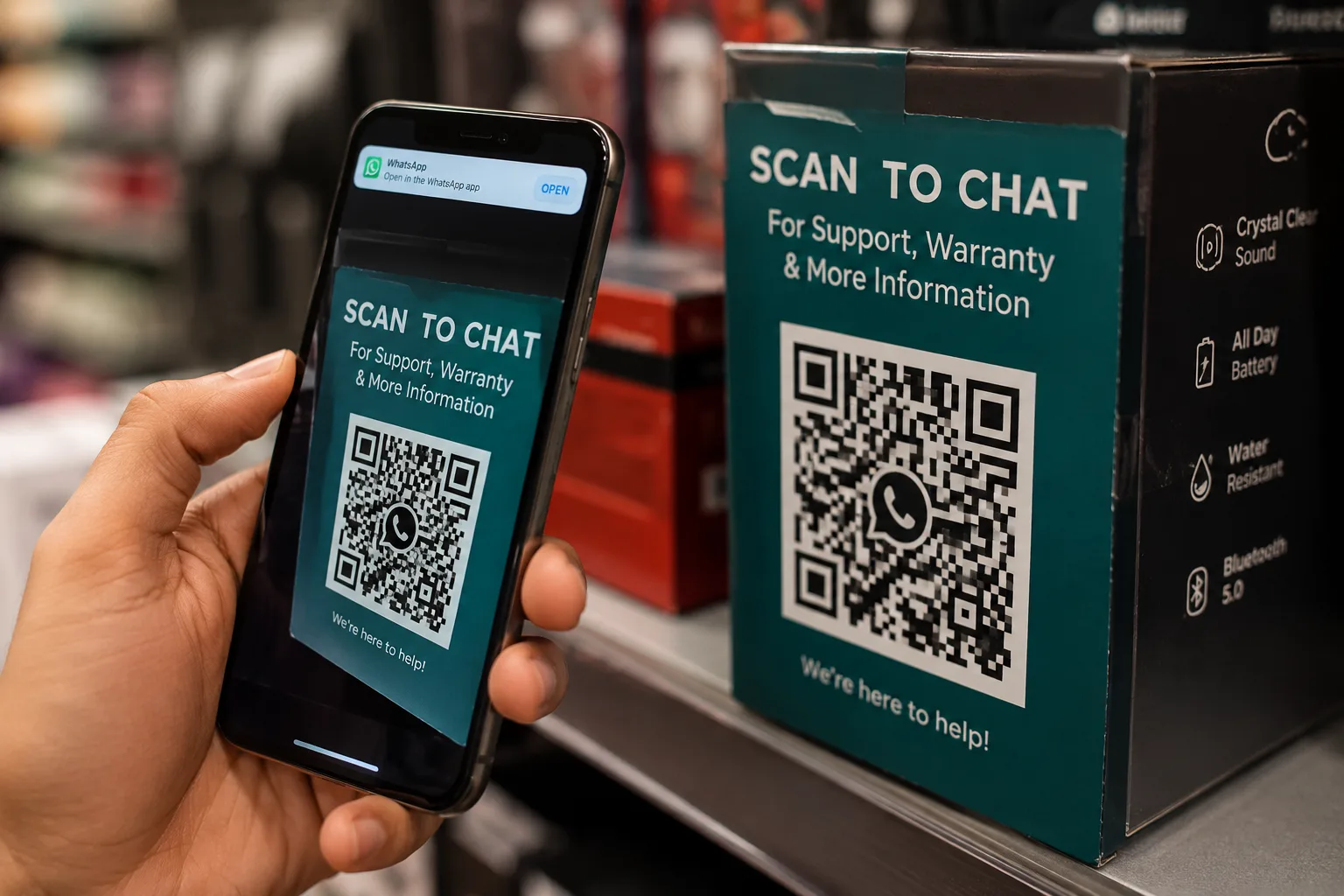
Traditional print and offline marketing materials such as packaging, flyers, retail window displays, and product catalogs often struggle with low customer engagement. The primary bottleneck is the "friction gap." When a customer spots a flyer or a physical package and wants to ask a question, request a quote, or sign up for a loyalty program, they are forced to type a complex website URL, search for the brand on social media, or manually save a ten-digit phone number into their contacts before sending a message. Each of these steps is a major drop-off point where potential leads are lost.
By implementing a WhatsApp QR Code for Business, you bridge this offline-to-online (O2O) divide instantly. A simple scan triggers a native chat window on the customer's phone, with a pre-filled welcome message drafted and ready to send. There is no manual typing, no searching, and no contact-saving required. It turns physical touchpoints into active, conversational lead capture channels in less than two seconds.
| Use Case | QR Placement | Expected Outcome |
|---|---|---|
| Product Packaging | Warranty Registration & Manuals | Higher registration rates & lower support inquiries |
| Receipt Footers | Loyalty Program & Feedback Opt-In | More repeat purchases & direct review collection |
| Storefront Windows | Instant Customer Support Chat | Higher foot-traffic-to-lead conversion rates |
Free Utility
Free WhatsApp QR Generator
Generate high-resolution Scan-to-Chat QR codes with custom pre-filled messages in less than two seconds.
2. ROI Comparison: Traditional Channels vs. WhatsApp QR Codes
To understand the business impact of transitioning your offline operations to conversational QR codes, compare the conversion pathways across these common scenarios:
| Business Scenario | Traditional Method | WhatsApp QR Code Method | Post-Scan Automation Advantage |
|---|---|---|---|
| Product Warranty & Registration | User types URL → fills out a 10-field web form on mobile. (High abandon rate). | Customer scans packaging QR → opens chat with pre-filled SKU details → taps send. | Auto-tags the customer profile with product details and saves metadata instantly in database. |
| Post-Purchase Feedback | Email survey links sent days later. (Typical response rates under 3%). | QR code on invoice footer or package insert → customer scans to start quick-reply chat. | Launches an interactive feedback sequence, sending a discount coupon code as a reward. |
| On-Shelf Product Support | Customer dials a support hotline or searches web for manual. (High frustration). | QR code on shelf display/tag → scans to receive immediate interactive video guide. | Triages basic inquiries via AI agent 24/7; escalates complex tickets to human support teams. |
3. The Placement Playbook: Deploying QR Codes for Marketing Attribution
Where you place your QR codes determines how you capture traffic, but how you structure the underlying links determines how you measure it. By using our free WhatsApp Link Generator, you can append a unique query parameter (?text=...) to each QR code's target URL. This allows you to track and attribute incoming leads to specific stores, packaging designs, or physical banners.
For example, if you manage multiple retail outlets or distribute different products, deploy unique pre-filled tracking codes:
- Storefront Windows: Encode
?text=promo-store-ahmedabadto track local foot traffic engagement. - Outer Box Packaging: Encode
?text=register-product-ato identify which product lines drive the most warranty sign-ups. - Delivery Insert Cards: Encode
?text=box-insert-loyaltyto measure how many customers opt-in for repeat discount broadcasts. - Receipt Footers: Encode
?text=receipt-coupon-jointo track post-transaction loyalty registration rates.
When scanned, these parameters feed directly into your central WhatsApp CRM, enabling immediate lead segmentation without manual data entry.
4. Industry-Specific O2O Use Cases (Long-Tail Opportunities)
Different industries require unique workflows to maximize conversion rates. Here is how specialized sectors deploy Scan to WhatsApp workflows to capture leads:
FMCG (Fast-Moving Consumer Goods)
FMCG brands use packaging QR codes to run sweepstakes, instant cash-back offers, or unlock exclusive recipes. Instead of launching complicated microsites, a simple scan opens WhatsApp and enters the user into the promotion. This allows the brand to capture direct-to-consumer (D2C) contact details and opt-in consent directly, building a valuable database for future marketing campaigns.
Consumer Electronics
Electronics packaging is perfect for QR-based manuals. Instead of shipping thick, multi-language paper manuals that customers immediately throw away, print a QR code that says: *"Scan to watch step-by-step setup guides."* The code opens a WhatsApp conversation where an interactive bot serves video guides, warranty registration links, and troubleshooting FAQs tailored to that exact device model.
Cosmetics & Beauty
Luxury cosmetics use QR codes on product outer packaging to provide product authentication, checking that the item is genuine. Additionally, a QR scan can initiate a beauty triage chatbot that matches skin tones, recommends complementary routines, or guides users to join exclusive VIP beauty loyalty channels.
Home & Furniture
Big-ticket items like flat-pack furniture require setup guidance. A QR code printed directly on the assembly instructions card connects the buyer with an instant video guide. Customers can also scan the receipt QR code to check delivery tracking details in real time or message the assembly team directly with photos if a part is missing.
5. The Reprint Prevention Strategy: Dynamic QR Redirects
One of the biggest operational risks in retail and manufacturing is packaging errors. If you print a static WhatsApp packaging QR directly on 50,000 product boxes and your phone number changes or you want to update the welcome message, the printed code becomes useless, resulting in wasted inventory or dead leads.
To prevent this, use a Dynamic Redirect Strategy. Instead of encoding the raw wa.me/ link directly in the QR code, encode a short redirect URL hosted on your domain (e.g., https://yourbrand.com/qr/support). Configure your web server to redirect that endpoint to your active WhatsApp link. If your phone number changes or you run a new seasonal campaign, you simply update the redirect rule in your dashboard without reprinting a single physical box. This reprint prevention layer is vital for scaling O2O packaging campaigns safely.
6. Triage Automation: From QR Scan to Coupon Delivery
A customer scanning your QR code expects an immediate response. The moment they tap send on the welcome message, an automated workflow should take over to capture the lead, route the conversation, and deliver value. Our WhatsApp Automation suite handles this instantly:
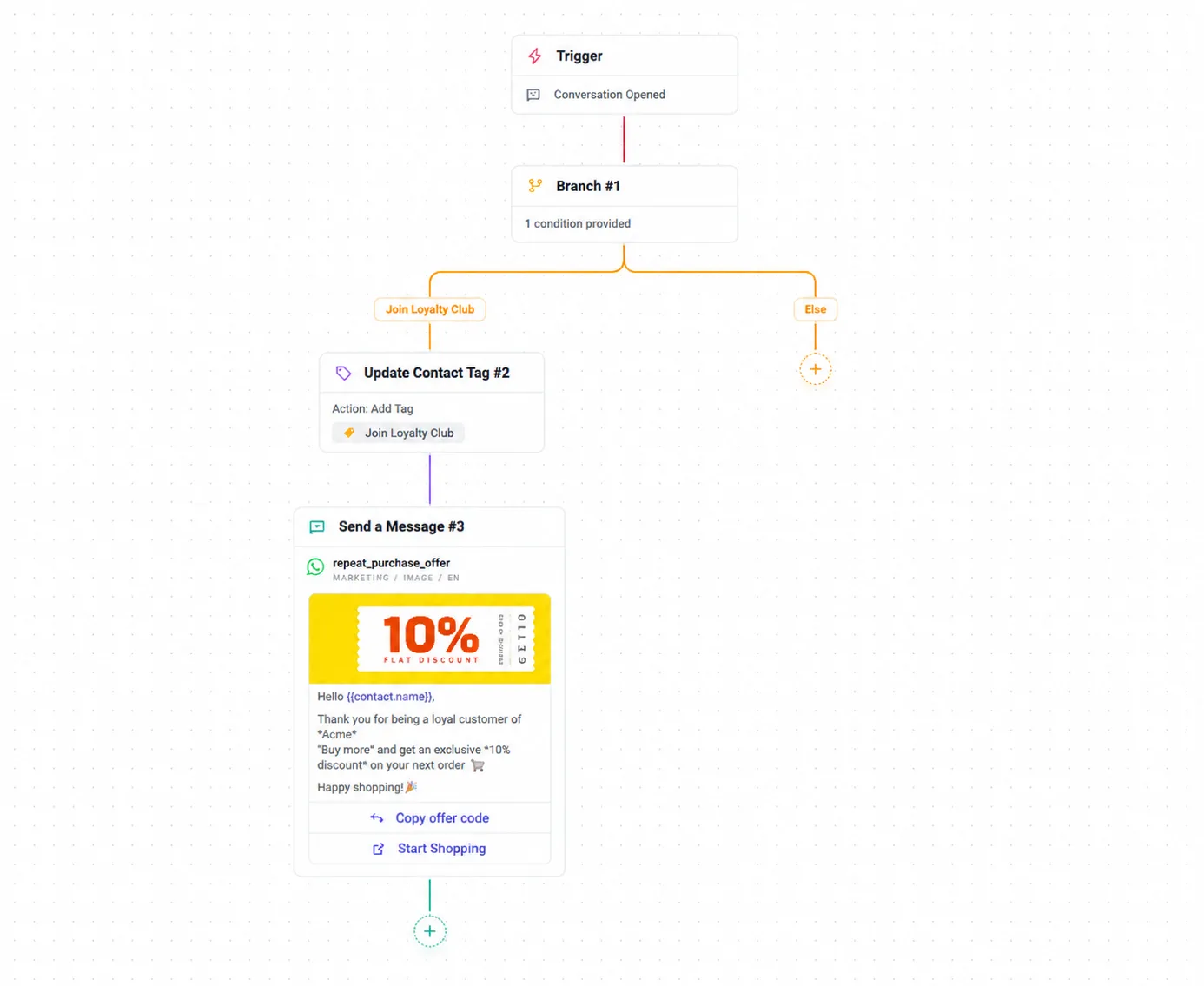
Here is how the automated workflow operates behind the scenes:
- QR Scan & Sent: The user scans the QR code on a packaging box and sends the pre-filled message: "Join Loyalty Club".
- AxoDesk Receives Message: The platform reads the incoming string and runs it through the routing rules.
- Auto Tagging: The system automatically applies the tag
Loyalty-Joinand updates the contact profile in the WhatsApp CRM. - Agent Assignment: The lead is assigned to the retail sales queue or routed to a specific agent in the WhatsApp Team Inbox.
- Coupon Delivery: An automated chatbot fires an immediate reply containing the loyalty welcome message and a 15% discount coupon code.
7. Implementation Flow: From Scan to Conversion
To scale your campaigns, your backend or CRM should automate the response flow the moment a user scans the QR code and texts you. Here is the step-by-step implementation journey that turns a physical scan into a loyal customer:
QR Scan
Customer scans the physical QR code on product packaging or receipt.
WhatsApp Opens
The native WhatsApp application instantly opens on the customer's phone.
Pre-filled Message Sent
The pre-drafted message (with tracking parameters) is sent with one tap.
Auto Tag Applied
Your CRM reads the tracking tag and auto-segments the contact profile.
Lead Assigned
The conversation is auto-routed to the appropriate queue or support agent.
Coupon Delivered
An automated chatbot immediately delivers a discount coupon, securing the lead.
8. Diagnostic FAQ: Scaling WhatsApp QR Codes
How do I generate a high-resolution WhatsApp QR code?
You can generate, test, and download high-resolution QR codes for free using our dedicated WhatsApp QR Code Generator. This tool allows you to set custom pre-filled message parameters and download the graphic as a clean PNG suitable for printing.
Can we broadcast promotional offers to customers who scanned our QR codes?
Yes. Once a customer messages you, they initiate the conversation, providing a high-intent window. You can use our WhatsApp Broadcasts tool to send bulk notifications, provided you establish clear opt-in consent during the first automated welcome response.
How do we handle customer opt-in and compliance when they scan a retail QR engagement channel?
Even though the customer initiates the chat by scanning, you must secure official consent before sending marketing broadcasts. In your first automated response, include an interactive button saying *"Subscribe to Updates"* or *"Join Club"* to log official opt-in status in your WhatsApp Chatbot flow.
Is there a limit to the number of scans a QR code can receive?
No. Static and dynamic QR codes generated through our system support unlimited scans and never expire. The only limit is your WhatsApp API account's messaging tier limits, which determine how many unique conversations you can support daily.
Founder of Axora Infotech at AxoDesk
Writes about conversational commerce, AI automation, and customer communication strategy.